


Documentation menu
Getting started
Dashboard & analytics
- Dashboard at a glance
- Cost analysis
- Pipeline performance
- Optimization insights
- Knowledge Base
- Connect your AI agent
Managed runners
- Runners overview
- Run your first job
- Migrate from GitHub-hosted
- Latchkey CLI
- The Runners page
- Custom runners (AI Scan)
- Self-healing
- Runner image & software
- Provisioning & warm pools
- Limits & concurrency
Caching
Team & notifications
Billing & plans
Help
Security architecture
How Latchkey isolates every CI job: dedicated single-use VMs, no inbound network, ephemeral credentials, encryption at rest and in transit, and the constraints the self-healing agent runs under.
This page is written for a security review. It describes how the runner platform is actually built - the isolation boundary, what leaves the machine, how credentials are handled, and what the self-healing agent is and is not allowed to do. For what the GitHub App can read and write in your repositories, see Security and GitHub permissions.
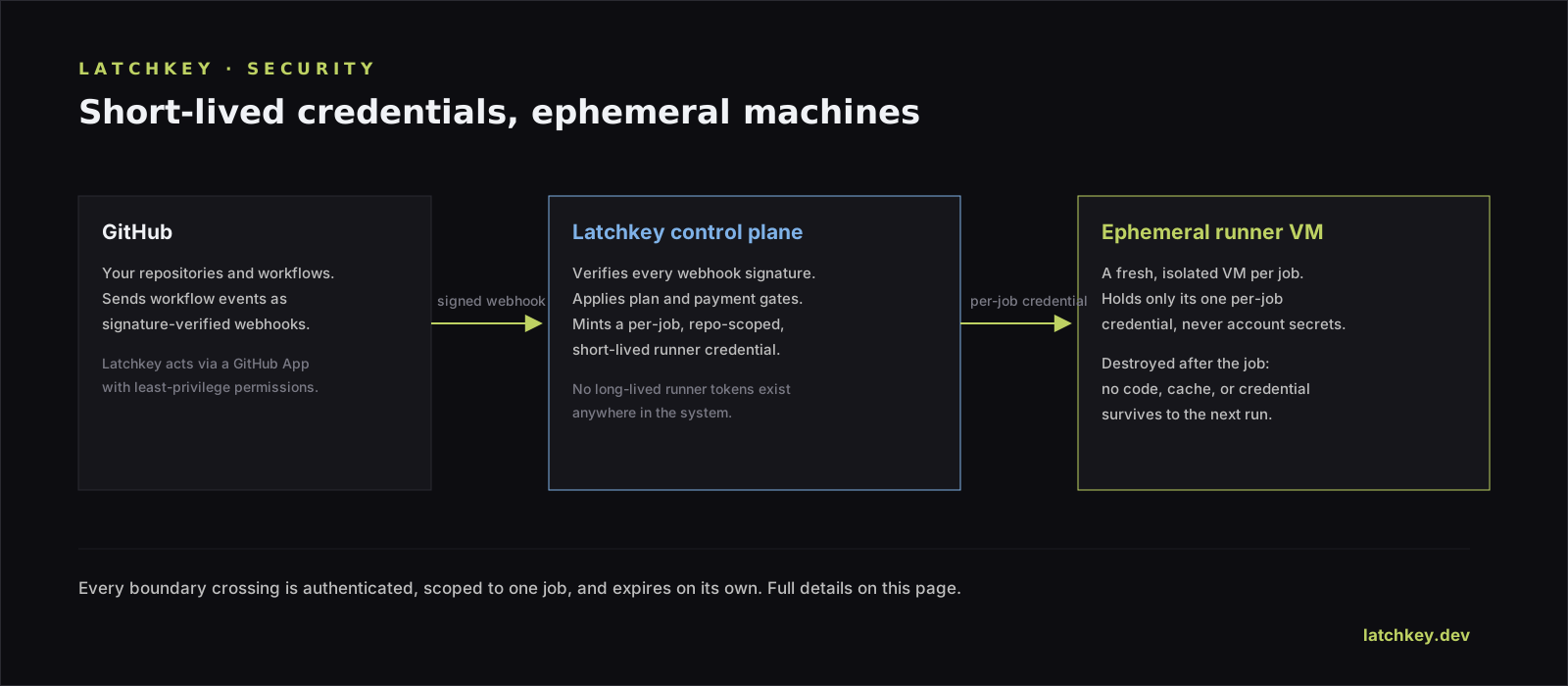
Isolation: one job, one machine#
Latchkey does not share a machine between jobs. Each job runs on a dedicated EC2 virtual machine (m6a-class, Ubuntu 24.04 LTS) launched for that job. Your job is not a container sharing a kernel with another tenant, and it is not a process on a long-lived shared host.
Single-use is enforced at the GitHub registration layer, not just by convention. Cold-start runners register with a just-in-time configuration, which GitHub accepts for exactly one job. Warm-pool runners register with the --ephemeral flag, which does the same. In both cases the instance is configured to terminate on shutdown, so it cannot be reused even if something goes wrong.
| Boundary | How it is enforced |
|---|---|
| One job per machine | GitHub just-in-time config (cold start) or --ephemeral registration (warm pool) |
| Machine cannot be reused | Instance-initiated shutdown behaviour is set to terminate, on both the launch template and the direct launch path |
| Disk does not survive | Root EBS volume is encrypted and marked delete-on-termination |
| Runaway jobs are reaped | A cleanup process terminates instances past the 4-hour job limit (8-hour hard cap) |
| Runners are bound to one workspace | Instances are tagged with the organization ID and registered to a single org runner group |
Runner groups are created with visibility: selected and an explicit repository list, so a runner registered for your workspace is only offered jobs from the repositories you enabled.
What runs as root, and why that is contained#
Inside its own VM, your job has full control: the runner user has passwordless sudo and Docker access. That is normal for CI - builds install packages and run containers - and it is safe precisely because the blast radius is one short-lived machine with no inbound network that is destroyed at the end of the job. We would rather state this plainly than imply a sandbox that does not exist.
Network#
What is locked down
- Runners launch into private subnets with no public IP address
- The runner security group has zero ingress rules - nothing on the internet can open a connection to a runner
- IMDSv2 is required, with the hop limit set to 1 so a bridge-networked container cannot reach instance credentials through the host
- Internal AWS traffic uses VPC gateway and interface endpoints rather than the public internet
- A WAF (rate limiting, AWS Common Rule Set, Known Bad Inputs) fronts the web applications
What your build can still reach
- Outbound traffic is open, because CI has to reach npm, PyPI, Docker Hub, your cloud, and your own services
- Treat any secret you expose to a job as reachable by that job - the same model as GitHub-hosted runners
Credentials and secrets#
Runner credentials are minted per job
A just-in-time runner configuration is generated for a single job and written to AWS Systems Manager Parameter Store as an encrypted SecureString, scoped to that installation and job.
The runner reads it once, then deletes it
On boot the instance fetches the parameter and immediately deletes it, because it contains key material. The same pattern applies to warm-pool registration tokens, which are cached only for their 55-minute usable life.
GitHub access is short-lived
The GitHub App signs a JWT with its private key and exchanges it for a short-lived installation access token per operation. There is no long-lived GitHub token sitting on a runner.
Platform secrets are scoped away from runners
The GitHub App private key lives in Parameter Store as a SecureString. The secret a runner can read is deliberately minimal and separate from the platform configuration secret, so a compromised instance role cannot read platform credentials.
Deploys authenticate to AWS through GitHub OIDC role assumption. There are no long-lived AWS access keys in CI. API keys for the MCP integration are stored as a SHA-256 hash only - the plaintext key is shown once at creation and never persisted.
Encryption#
| Data | At rest | In transit |
|---|---|---|
| Runner root disk | Encrypted EBS (gp3), deleted on termination | n/a |
| Build cache (S3) | SSE-S3 (AES-256), 14-day expiry | TLS |
| Application database | Encrypted storage, not publicly accessible | TLS |
| Cache / queue layer | Encryption at rest and in transit enabled | TLS |
| Runner configs and app keys | Parameter Store SecureString | TLS |
| API traffic | n/a | TLS 1.2 minimum on the API domain |
Build cache isolation#
Cache objects are stored in S3 under a key prefix derived from your organization ID, and the tenant ID is injected by the control plane from the job request - a job cannot claim to be another tenant by setting an environment variable. Objects expire after 14 days.
What leaves the runner#
Two kinds of data leave the machine, and it is worth being precise about the second one.
- Run and job metadata - names, timings, statuses, labels, and the workflow YAML - which powers the analytics and optimization features.
- Failing step output. When a step fails, the self-healing pipeline captures that step's standard output and error (capped at 1 MiB each) and stores it so the failure can be diagnosed and, where relevant, turned into a proposed fix. Retention is 90 days.
How the self-healing agent is constrained#
Self-healing is the part a reviewer should push hardest on, because it is the one component that changes a running job. Here is exactly what it can do.
- It runs as the
runneruser, not root, as a systemd service. - It listens on a Unix domain socket with group-restricted permissions. It has no TCP listener and no network surface.
- It is invoked through a shim that only intercepts the runner agent's own step scripts; every other command passes straight through untouched.
- It fails open: if the agent times out, refuses, or errors, the command runs exactly as it would have without Latchkey. A broken healer cannot break your build.
The privileged operations it can perform are allowlisted, not filtered:
| Control | What it means |
|---|---|
| Sudo allowlist | Exactly one anchored pattern is permitted - a non-interactive apt-get install of a single package. Anything else beginning with sudo is rejected before the process is spawned. |
| Package allowlist | Installable packages come from a compile-time list, enforced independently at two stages because one stage builds commands from untrusted build output. |
| Environment safety floor | Setting LD_PRELOAD, LD_LIBRARY_PATH, PATH, BASH_ENV, or ENV is denied, as are shell metacharacters and command substitution. |
| Sensitive path denial | Reads under /etc, /root, /proc, /sys, /var/log, ~/.ssh, ~/.aws, and ~/.config/gh are denied. |
| AI tool sandbox | Stage-3 tools run inside a bubblewrap-based sandbox that starts default-deny - no network, no write paths - and is widened per tool to the narrowest set needed. |
| No resident AI key | The reasoning step authenticates to AWS Bedrock through the instance role, so there is no long-lived model API key sitting on a machine that runs your code. |
| Kill switch | Self-healing can be turned off per workspace. |
What the GitHub App can access#
Every permission below exists to power a specific feature. Grouped by what it is for, rather than as a flat list, so you can see the reason next to the grant.
| Purpose | Access | Permissions |
|---|---|---|
| Run your jobs on Latchkey runners | Read and write | Organization self-hosted runners, administration, organization administration |
| See what your pipelines did | Read | Actions, artifact metadata, metadata |
| React to jobs as they happen | Read and write | Organization hooks, repository hooks |
| Read workflows and propose fixes as PRs | Read and write | Workflows, code, pull requests |
| Model your GitHub costs accurately | Read | Organization plan |
| Check who is in your organization | Read | Members |
| Surface security findings in your dashboard | Read | Dependabot alerts, secret scanning alerts, security events, Dependabot secrets |
| Build runner images matched to your stack | Read | Organization runner custom images |
Changes to your repositories#
Latchkey never pushes to your default branch. Every change is a pull request you review, and the write path is gated three ways:
- The file path must resolve as editable against a per-repository manifest. Unmatched paths default to not editable - the check fails closed.
- Pull requests originating from forks are rejected, and a missing fork signal is also rejected rather than assumed safe.
- A proposed fix must match its failure signature in the captured logs, or it is suppressed.
Operational security#
- Runner images are rebuilt weekly so OS security patches land on the fleet on a schedule.
- The runner instance role is least-privilege, including an explicit deny that narrows an AWS-managed policy's account-wide Parameter Store access down to Latchkey's own runner paths.
- Every mutating administrative action is written to an audit log with operator, action, target, parameters, and result.
- Access to the dashboard and API is authenticated by a JWT authorizer at the API gateway. Workspace roles are Owner, Admin, and Member, with owners protected from removal or demotion.
Data retention#
What Latchkey stores, and for how long.
| Data | Retention |
|---|---|
| Your source code on the runner | Destroyed with the instance at the end of the job |
| Build cache objects | 14 days from last write |
| Failing-step output captured for diagnosis | 90 days |
| Self-heal attempt records | 90 days |
| Proposed fix records | 365 days |
| Run and job metadata powering your dashboards | Retained while the repository stays enabled |
Disabling a repository stops collection for it. Deleting your workspace removes its data. If you need a specific retention window for your organization, ask and we will talk it through.
Reporting a vulnerability#
Email security@latchkey.dev. Please do not open a public GitHub issue for a security report.
Does my source code stay on the runner after the job?
No. The instance and its encrypted root volume are destroyed when the job finishes. Nothing you checked out survives, other than build cache entries you explicitly opted into, which expire after 14 days.
Can another customer's job see mine?
No. Each job runs on its own virtual machine, registered for a single workspace and destroyed after that one job. Runners have no inbound network access.
Can the self-healing agent run arbitrary commands on my build?
No. Privileged actions are allowlisted rather than filtered: a single permitted sudo pattern, a fixed package list, denial of environment variables that enable code injection, and a default-deny sandbox for the AI tool stage. If the agent fails for any reason, your command runs exactly as it would have without it.
Are my build secrets visible to Latchkey?
No. Your GitHub Actions secrets are injected by GitHub directly into your job at runtime, exactly as on GitHub-hosted runners, and Latchkey never requests or stores their values. GitHub masks registered secrets in log output before any of it reaches us.