


Documentation menu
Getting started
Dashboard & analytics
- Dashboard at a glance
- Cost analysis
- Pipeline performance
- Optimization insights
- Knowledge Base
- Connect your AI agent
Managed runners
- Runners overview
- Run your first job
- Migrate from GitHub-hosted
- Latchkey CLI
- The Runners page
- Custom runners (AI Scan)
- Self-healing
- Runner image & software
- Provisioning & warm pools
- Limits & concurrency
Caching
Team & notifications
Billing & plans
Help
Migrate from GitHub-hosted runners
The full migration guide: what actually changes, the three migration paths, the exact label mapping the Migrate Runners tool applies, what the PRs contain, verification, and rollback.
Migrating to Latchkey runners is a routing change, not a rewrite. The runs-on: label is the only thing that decides which runner takes a job, so it is the only thing a migration touches. Everything else keeps working exactly as before: the actions you call, the secrets GitHub injects, your environments and protection rules, and caches on GitHub's side. And GitHub-hosted labels keep working alongside latchkey-* labels, so nothing forces a full cutover.
What changes, and what keeps working#
What changes
- The
runs-on:label on each job you migrate
What keeps working unchanged
- Marketplace and custom actions
- Repository, environment, and organization secrets
- Environments and their protection rules
- Caches stored on GitHub's side, including
actions/cache
Before you start#
Prerequisites
Three ways to migrate#
The three paths compose: most teams hand-edit one workflow as a pilot, bulk-migrate with the tool, and reach for AI Scan on the handful of repositories that deserve their own image.
| Path | Best for |
|---|---|
| Migrate Runners tool | Bulk migration: up to 20 monitored repositories per pass, one reviewable PR each |
Hand-editing runs-on: | A single workflow, a pilot job, or labels the tool does not recognize |
| AI Scan | Repositories that deserve a right-sized custom image rather than a preset |
Path 1: the Migrate Runners tool#
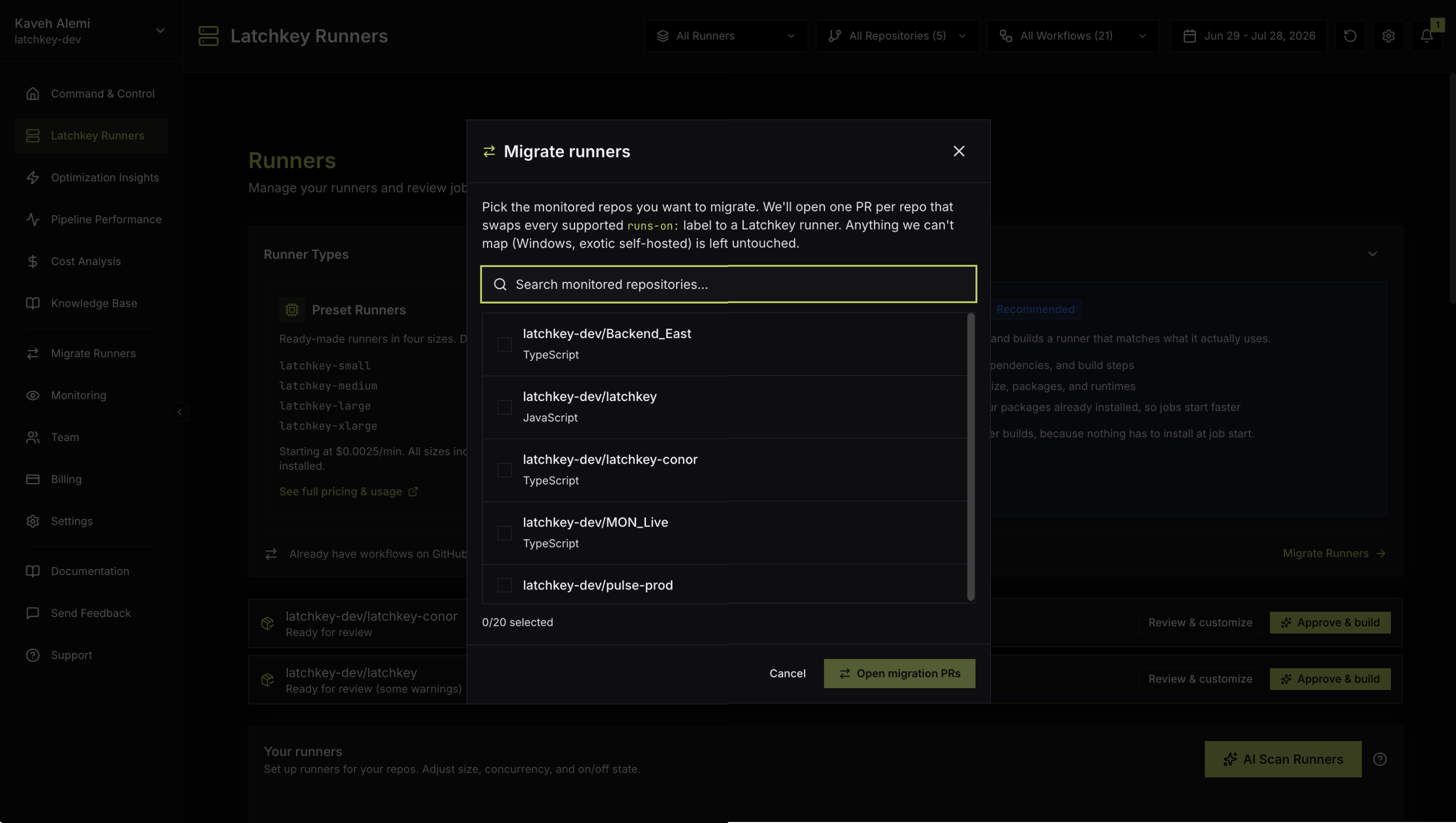
The tool has two entry points, and both open the same modal: the Migrate Runners item in the dashboard sidebar, and the CTA in the Runner Types card footer on the Runners page. Opening migration PRs requires an owner or admin role.
Nothing in a repository changes until your team merges its pull request. If a repository already has an open migration PR, the tool links to it instead of opening a duplicate; if there is nothing left to switch, it shows a Nothing to migrate state. With more than 20 repositories to move, migrate in passes.
The exact mapping the tool applies#
| In your workflow | What the PR does |
|---|---|
ubuntu-latest, ubuntu-24.04, ubuntu-22.04 | Switched to latchkey-small, the lowest-cost size |
| Other Linux size specs | Switched to the smallest Latchkey size that meets their CPU and memory |
| Windows and macOS jobs | Left untouched |
| Self-hosted labels the tool does not recognize | Left untouched |
Any line containing a ${{ }} expression, such as ${{ matrix.os }} | Left untouched |
The untouched rows are deliberate: jobs the tool cannot confidently route keep running exactly where they run today, so you can migrate your Linux fleet now and leave mixed-OS workflows safely intact. Anything the tool skips can still be moved by hand whenever you are ready.
What each pull request contains#
Each PR rewrites the runs-on: lines and nothing else; as the PR body itself puts it, "Only runs-on: lines were touched. Every other line in each file is byte-identical." The one exception: when the migration also injects Latchkey cache steps, those steps are the only additions beyond the runs-on lines, and the body says so. A before and after mapping table for each file shows exactly what changed, so review takes minutes, not days.
Path 2: hand-edit a single workflow#
For one workflow the change is one line per job, and both label forms route identically:
jobs:
  test:
runs-on: latchkey-smalljobs:
test:
runs-on: [self-hosted, latchkey-small]The step-by-step version of this path, including verifying the first run and picking a size, is Run your first job.
Path 3: AI Scan, for repos that deserve their own image#
Some repositories are worth more than a label swap. AI Scan reads the workflows a repository actually runs and proposes a custom runner configuration with a right-sized shape and an image that preinstalls the repo's toolchain, so jobs skip their setup steps entirely. If that sounds like one of yours, start at Custom runners with AI Scan and migrate that repository to its custom label instead of a preset.
An incremental strategy#
You do not need a big-bang migration, and we suggest avoiding one. Start with one low-risk repository, ideally a flaky or slow one where cheaper minutes, faster pickup, and self-healing are most visible, and let it run for a week before you commit the fleet.
Jobs that need GPU, Windows, macOS, or arm64 hosts stay on GitHub-hosted or other runners, and that is fine indefinitely: runs-on is decided per job, so a workflow can mix Latchkey and GitHub-hosted jobs freely.
Verify after merging#
Check where the job ran
In the GitHub run view, the job's runner name confirms a Latchkey machine took it rather than a GitHub-hosted one. Expect a fresh name on every run: runners are single-use by design.
Watch the minutes land
Migrated jobs' minutes accrue against your plan's free tier. The Billing modal shows free-tier progress and estimated cost so far, and the Cost Analysis page tracks Latchkey runner spend alongside your GitHub spend; details in Runner usage and free minutes.
Rolling back#
Rollback is the same one-line change in reverse: revert the migration PR and jobs route back to GitHub-hosted runners immediately. There is nothing else to undo, no agent to uninstall and no configuration to clean up, and the repository stays monitored, so your analytics continue either way.
Common questions#
Do I need to change my secrets?
No. GitHub injects your Actions secrets into the job at runtime on Latchkey runners exactly as it does on GitHub-hosted ones. Nothing is reconfigured, and Latchkey never reads their values.
Does actions/cache keep working?
Yes, unchanged. For faster saves and restores on Latchkey runners, the Latchkey cache action (latchkey-dev/cache-action@v1) is a drop-in upgrade; see Dependency caching.
Can I mix Latchkey and GitHub-hosted runners?
Yes, freely and indefinitely. runs-on is decided per job, so each job in a workflow can run wherever it fits best.