


Documentation menu
Getting started
Dashboard & analytics
- Dashboard at a glance
- Cost analysis
- Pipeline performance
- Optimization insights
- Knowledge Base
- Connect your AI agent
Managed runners
- Runners overview
- Run your first job
- Migrate from GitHub-hosted
- Latchkey CLI
- The Runners page
- Custom runners (AI Scan)
- Self-healing
- Runner image & software
- Provisioning & warm pools
- Limits & concurrency
Caching
Team & notifications
Billing & plans
Help
Dependency caching (Fast Cache)
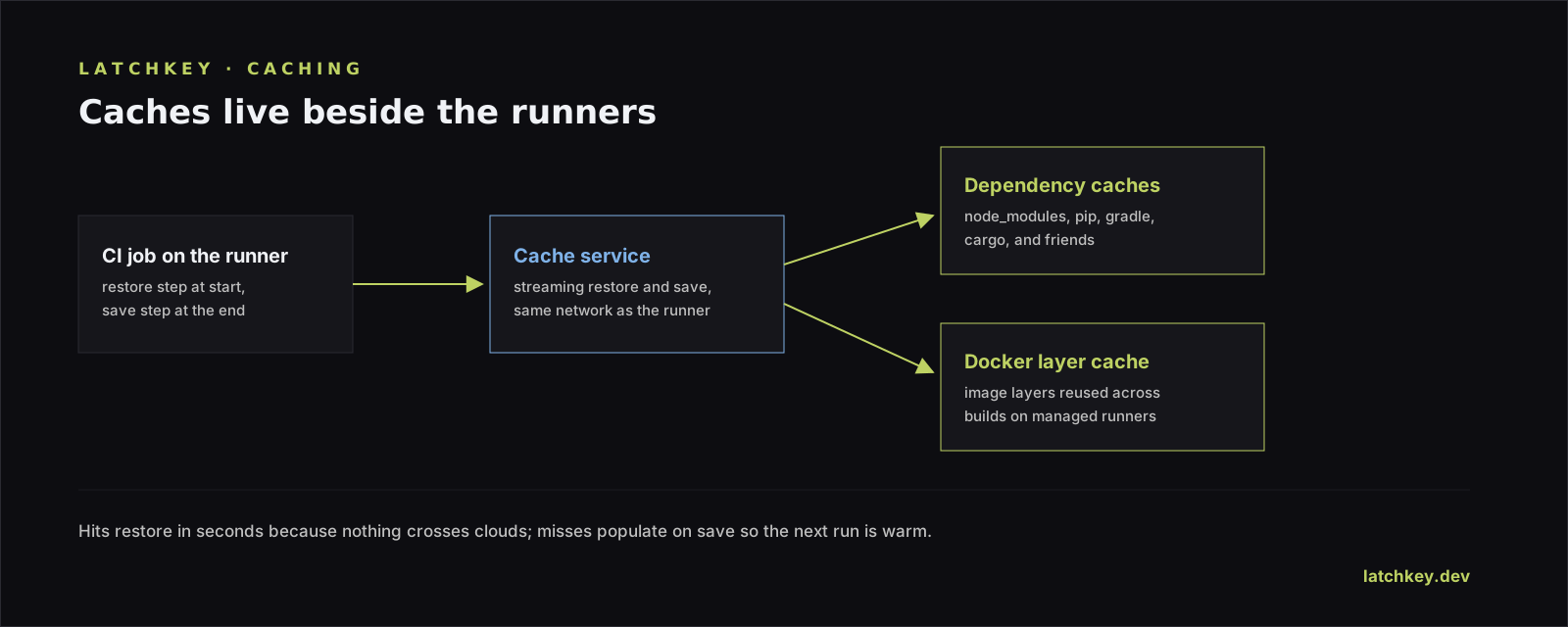
Latchkey Fast Cache saves and restores dependency caches in a single streaming request, with storage in the same region as your runner and zero configuration.
Latchkey Fast Cache (latchkey-dev/cache-action@v1) is a lightweight GitHub Action for saving and restoring dependency caches (node_modules, package registries, build artifacts) on Latchkey managed runners. Repeat runs skip installs your pipeline has already done.
Why it is fast#
- Cache data moves in a single streaming HTTP request instead of the serial chunk pattern
actions/cache@v4uses: no per-chunk round trips, no temp files. - Compression and decompression are multi-threaded (zstd), and uploads and downloads run as parallel transfers.
- Storage lives in the same region as your runner, so the bytes never travel far.
- Every save and restore prints its timing in the job log, so you can measure the difference on your own builds.
What caching is worth: a worked example#
The numbers below are illustrative, not a measured benchmark: they show the shape of the win, and your own builds will differ. Picture a Node.js app on latchkey-medium with a ~400 MB node_modules. Without caching, npm ci resolves and downloads everything on every run: call it ~3 minutes (180 s). With a cache hit, the restore is a single streaming download decompressed on the fly, landing in seconds (say ~10 s), and if you skip the install step on a hit (the workflow example below does exactly that) the 3-minute install disappears; teams that run npm ci anyway see it finish in tens of seconds against the warm node_modules. Call the hit path ~30 s of dependency work instead of 180.
On those assumptions that is roughly 2.5 minutes saved per run, and at 100 runs a week it works out to about 250 runner-minutes a week, a little over four hours. Caching does not help every run: a cold key after a lockfile change still pays the full install plus the save (~195 s here), slightly worse than no cache at all; the payoff is every hit that follows.
Add it to a workflow#
Add two steps: one with action: restore and one with action: save. Each takes a key and one or more path entries (newline or space separated; ~ is supported). The restore step exposes a cache-hit output so you can skip install steps when the cache lands.
jobs:
  build:
    runs-on: latchkey-medium
    steps:
      - uses: actions/checkout@v4

      - name: Restore dependencies
        id: cache
        uses: latchkey-dev/cache-action@v1
        with:
          action: restore
          key: deps-${{ runner.os }}-${{ hashFiles('package-lock.json') }}
          path: node_modules

      - name: Install dependencies
        if: steps.cache.outputs.cache-hit != 'true'
        run: npm ci

      - name: Save dependencies
        uses: latchkey-dev/cache-action@v1
        with:
          action: save
          key: deps-${{ runner.os }}-${{ hashFiles('package-lock.json') }}
          path: node_modules
Switching from actions/cache#
actions/cache@v4
- Serial chunked transfers with per-chunk round trips
- Works on any runner
- Inputs: path, key, restore-keys
latchkey-dev/cache-action@v1
- One streaming request per save or restore
- Storage pre-provisioned, same region as the runner
- The same inputs carry over: switching is a one-line change
Safe defaults#
- A restore failure never fails the job: you get a warning,
cache-hitreadsfalse, and the run continues. - Save is skipped automatically when the key already exists, so identical caches are never re-uploaded.
- Caches are isolated per organization and automatically versioned by operating system; encode finer isolation (like OS versions) in your cache key.
- Cache entries are stored server-side with a 14-day retention, so stale caches age out on their own.
What you see in job logs#
| Log line | What it tells you |
|---|---|
Cache restored in {N}ms | The restore completed, and how long it took |
Cache saved in {N}ms | The save completed, and how long it took |
Cache miss | No cache existed for the key; cache-hit is false and the job continues |
Cache already exists for key=..., skipping save | The save was skipped because an identical key is already stored |
Caching you do not have to find#
The AI Scan detects which caches your project needs and lists them in the proposed runner configuration. The "Get more from Latchkey" section of AI Insight can propose adding Latchkey caching to a workflow as a one-click "Add Latchkey caching" PR, and the Migrate Runners tool can inject cache steps as it moves workflows over. Teams that never hand-tune caching still get it.
For the broader craft - trimming install time, splitting slow suites, parallelizing - the Learn library has a hands-on CI optimization hub with guides you can apply on any runner.
How do I switch from actions/cache to Fast Cache?
Replace actions/cache with latchkey-dev/cache-action@v1. Your existing path, key and restore-keys inputs carry over unchanged, so the diff is one line and the cache semantics you already reasoned about stay the same.
What makes Fast Cache faster than actions/cache?
One streaming request per save or restore instead of a multi-step upload, multi-threaded zstd compression, and cache storage in the same region as the runner. The saving is in transfer and decompression, which is where most of the wall-clock in a cache step actually goes.
What happens if the cache fails?
The build continues. A restore failure warns in the log and the step proceeds to a normal install, so a cache problem can slow a build down but never fails one. That is deliberate: a cache is an optimisation, and an optimisation that can break a pipeline is a liability.