


Documentation menu
Getting started
Dashboard & analytics
- Dashboard at a glance
- Cost analysis
- Pipeline performance
- Optimization insights
- Knowledge Base
- Connect your AI agent
Managed runners
- Runners overview
- Run your first job
- Migrate from GitHub-hosted
- Latchkey CLI
- The Runners page
- Custom runners (AI Scan)
- Self-healing
- Runner image & software
- Provisioning & warm pools
- Limits & concurrency
Caching
Team & notifications
Billing & plans
Help
Knowledge Base
Upload runbooks, architecture notes, and context documents so AI recommendations reflect how your systems actually work.
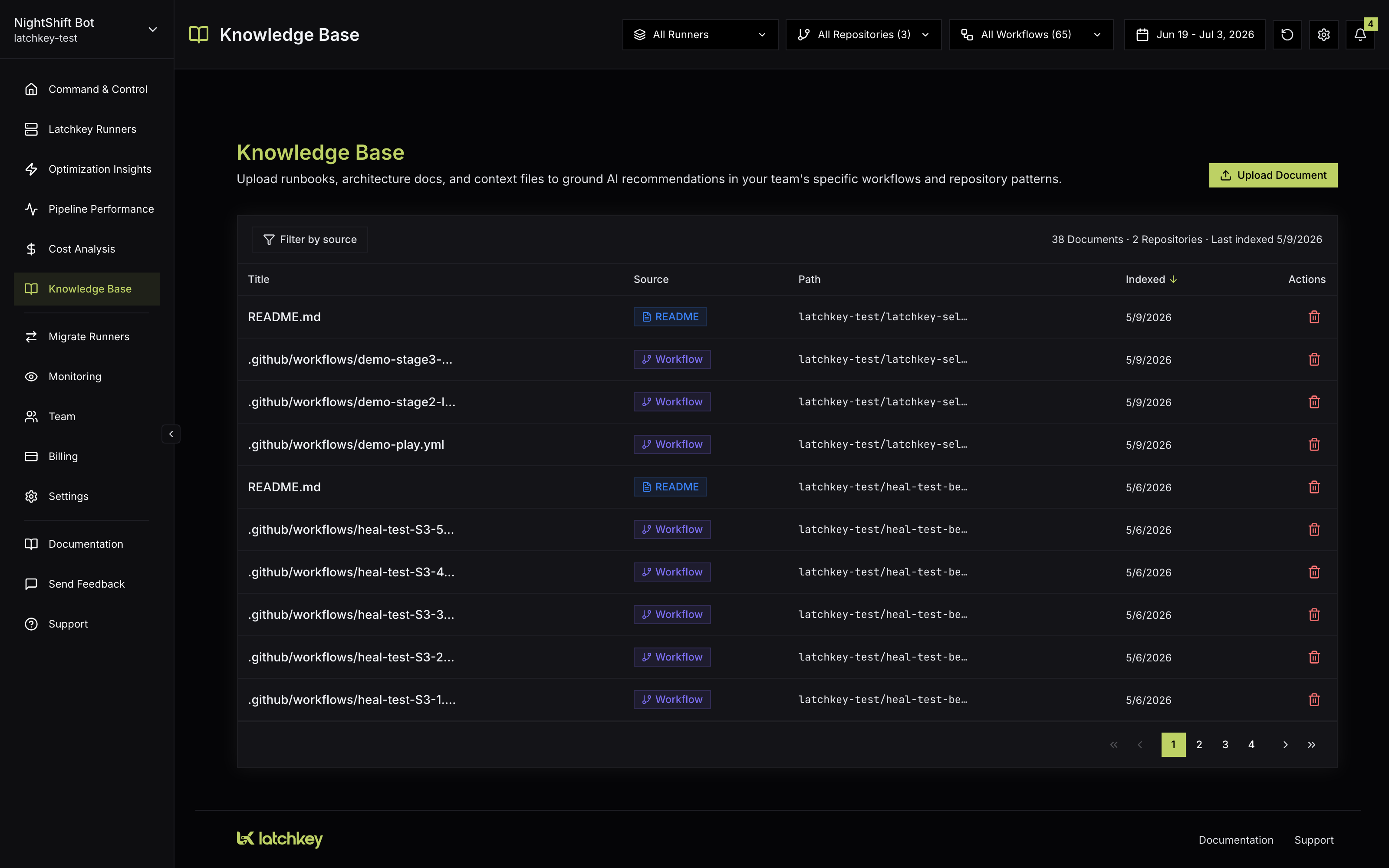
The Knowledge Base page lets you give Latchkey's AI context that is not visible in your workflow files: runbooks, architecture docs, deployment conventions, naming standards, and anything else an engineer would want to know before proposing a change to your CI.
How it works#
Monitored repositories are indexed automatically when you enable monitoring, so the AI already knows your workflow layout; the Knowledge Base is for everything beyond that.
What gets indexed automatically#
When you enable monitoring on a repository, Latchkey indexes its documentation on its own:
README.md,CONTRIBUTING.md, and root-level docs such asSECURITY.mdandCHANGELOG.md.- Markdown in
docs/,doc/, anddocumentation/folders. - GitHub Actions workflow files.
CODEOWNERSplus issue and PR templates.- CI configs from other systems, including CircleCI, Jenkins, Travis, GitLab CI, Bitbucket Pipelines, and Azure Pipelines.
Unchanged files are skipped on re-index, so the index stays current without repeat work. The AI knows your real workflows and docs without anyone uploading a thing.
The built-in System library#
Latchkey also ships a curated library of CI/CD knowledge covering languages, frameworks, CI/CD tooling, and runner patterns. These documents appear in the table with a System badge; they are read-only and cannot be deleted. The practical effect: recommendations are well-grounded from day one, even before you upload anything.
Uploading documents#
Click Upload Document to add your own. Type or paste content directly, or load a file by drag-and-drop or browse. Each document needs a title (up to 200 characters) and content, with a live character count as you type. Accepted file types are .md, .yaml, .yml, .txt, and .json, up to 500KB per document; the dialog flags unsupported types and oversized files before anything is saved.
How grounding changes recommendations#
Think of it as the difference between advice from a skilled contractor and advice from the engineer who has worked in your codebase for a year. Both can read your workflow files; only one knows which pipeline is deploy-critical, which failure is a known issue, and why your caching is set up the way it is.
Without grounding
- The AI reasons from your workflow files and run history alone
- Proposals follow common CI patterns, which may not be your patterns
- It has no way to know which workflows are safe to touch aggressively
With grounding
- Proposed changes stay idiomatic to your caching, artifact, and naming standards
- A deploy-critical map changes how aggressive recommendations dare to be
- Runbooks teach the AI what "known issue" looks like for your team
The payoff shows up across Latchkey's AI surfaces, including AI Insight: what you upload here is part of the ground truth Latchkey reasons from, so what gets proposed respects how your systems actually work.
High-leverage uploads#
What a good upload looks like#
You do not need polished documentation; you need documents that carry decisions. Some concrete shapes that work well (these are suggestions, not requirements):
- A flaky-pipeline runbook that names the workflow as it appears in CI, describes the failure signatures your team considers "known", and states the accepted workaround.
- A deploy map that lists which workflows gate production and which must never be modified without human review.
- A conventions doc that spells out how you name caches and artifacts, and crucially, why those rules exist.
- Architecture notes that explain the relationships an outsider could not infer: which services build together, what depends on what, where the load-bearing weirdness lives.
The common thread: write down the why, not just the what. The AI can already see what your workflows do; what it cannot see is the reasoning and the constraints behind them.
A quick self-check before uploading
See what the AI knows#
Every indexed document appears in a sortable table with its title, source badge, path, and indexed time. A summary line shows the document count, the number of repositories represented, and when the most recent indexing ran. The table paginates at 10 documents per page, includes a fullscreen view, and a source filter narrows the list to one slice: All Sources, README, Workflow, Docs, Manual, or System.
| Source badge | What it marks |
|---|---|
| README | Repository README files |
| Workflow | GitHub Actions workflow files |
| Docs | Markdown from repository documentation folders |
| Manual | Documents your team uploaded |
| System | Latchkey's curated CI/CD library (read-only) |
You can delete any non-System document from its row. Latchkey asks for confirmation first, and deletion cannot be undone.
What file types can I upload to the Knowledge Base?
Markdown, YAML, plain text and JSON (.md, .yaml, .yml, .txt, .json) up to 500KB each. Runbooks, architecture notes and team conventions are the highest-leverage uploads because they encode decisions the repository itself does not.
Do I have to upload anything for this to work?
No. Monitored repositories index themselves, covering READMEs, docs folders, workflow files and other CI configuration, and a curated read-only System library of CI/CD knowledge ships with the product. Uploads add your context on top of that baseline.
What does grounding actually change?
It changes whether a recommendation respects how your systems really work. Without your runbooks the model reasons from general CI practice; with them it can account for the constraint that made you do something unusual, which is the difference between a suggestion you apply and one you dismiss.