
November Update: Latchkey CI Is Live

Kaveh Alemi
CTO, Latchkey
Last issue ended with a promise: running whole pipelines on Latchkey, not just single commands. In October it reached production, and most of what else shipped this month exists to make it practical to move onto.
Latchkey CI
Until October, Latchkey ran your jobs in one of two ways: GitHub Actions jobs on our managed runners, or one-off commands from the CLI. Latchkey CI is the third and the biggest: Latchkey runs the pipeline itself.
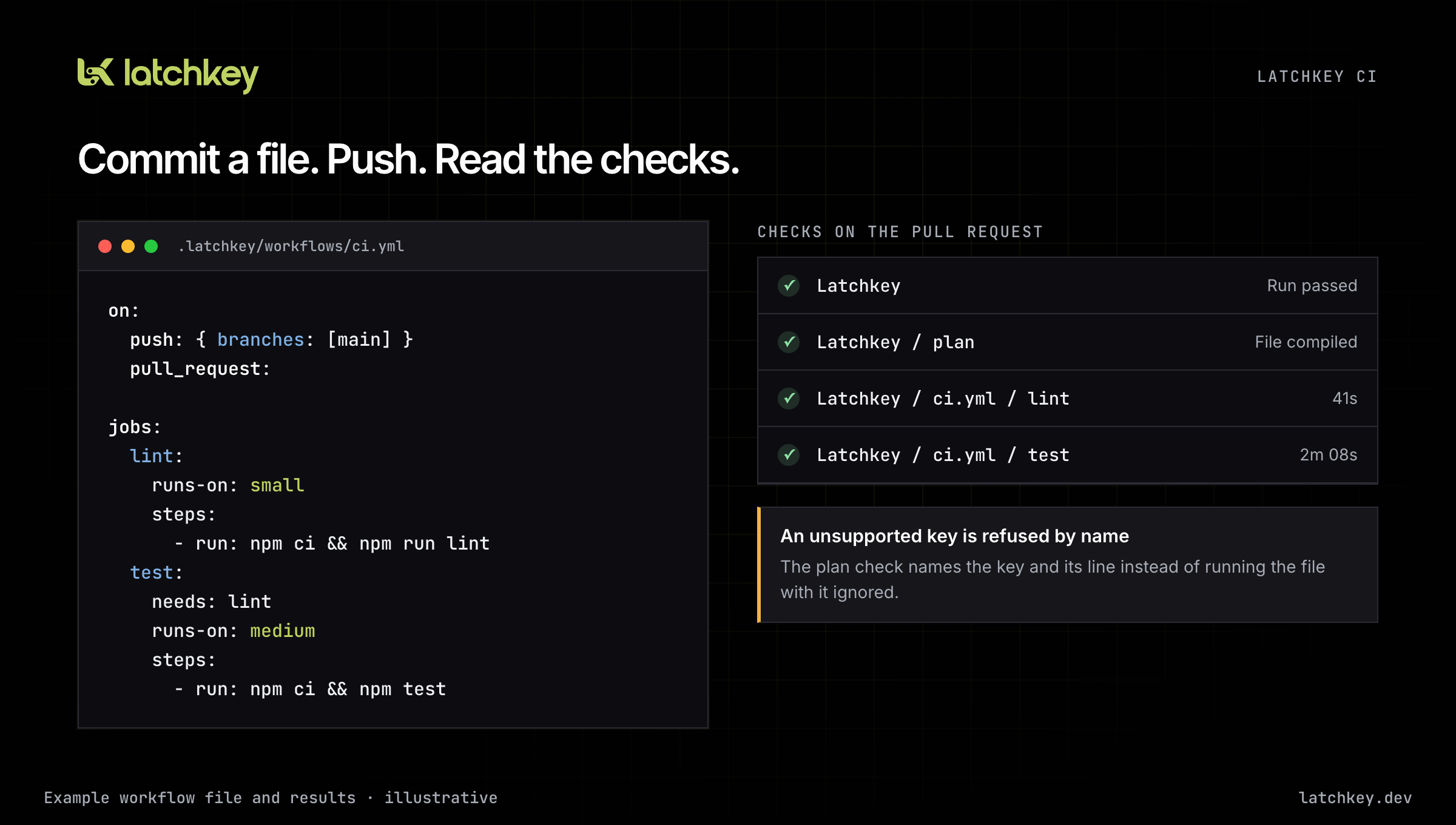
How you use it. Commit a workflow file under .latchkey/workflows/, one file per pipeline, in the shape you already know from GitHub Actions: on: for the pushes and pull requests that start it, jobs with runs-on: naming a Latchkey size (small, medium, large or xlarge), and steps with run:. Push, and Latchkey runs the file as it stands at that commit, on fresh machines, and writes the result back to your pull request as checks, for the run and for each of its jobs.
A file can already carry most of what a real pipeline needs: needs: to order jobs, a matrix, service containers, job outputs:, if: conditions, concurrency: groups that keep the newest waiting run, and on: workflow_dispatch to start a run by hand from the Runs page or through your agent. Jobs pass files to each other with artifacts and keep dependencies between runs with the cache steps.
Why it works that way. Latchkey does not run GitHub actions, and we will not emulate them. A uses: line names one of our own versioned steps (latchkey/cache-restore, latchkey/setup-node, latchkey/aws-login and a few more), and checkout is automatic. The runner image carries twelve language toolchains, so most actions/setup-* steps simply go away.
When a file asks for something we do not support, Latchkey refuses it by name, with the line, instead of running it with a key quietly ignored. That is the "reasons, not silence" item from last issue's list: a run that does not happen tells you why.
What it deliberately does not do yet. We recommend you do not mark Latchkey checks as required in branch protection yet. A check Latchkey cannot write stays absent, and a required absent check blocks the merge. GitHub Actions keeps working exactly as before, and a personal GitHub account can run Latchkey CI, with no organization needed.
Migrate from GitHub Actions
Nobody rewrites a working pipeline on faith, so the way onto Latchkey CI is a guided move you can check before you commit to it. Open Migrate in the dashboard and pick a repository. Five steps follow.
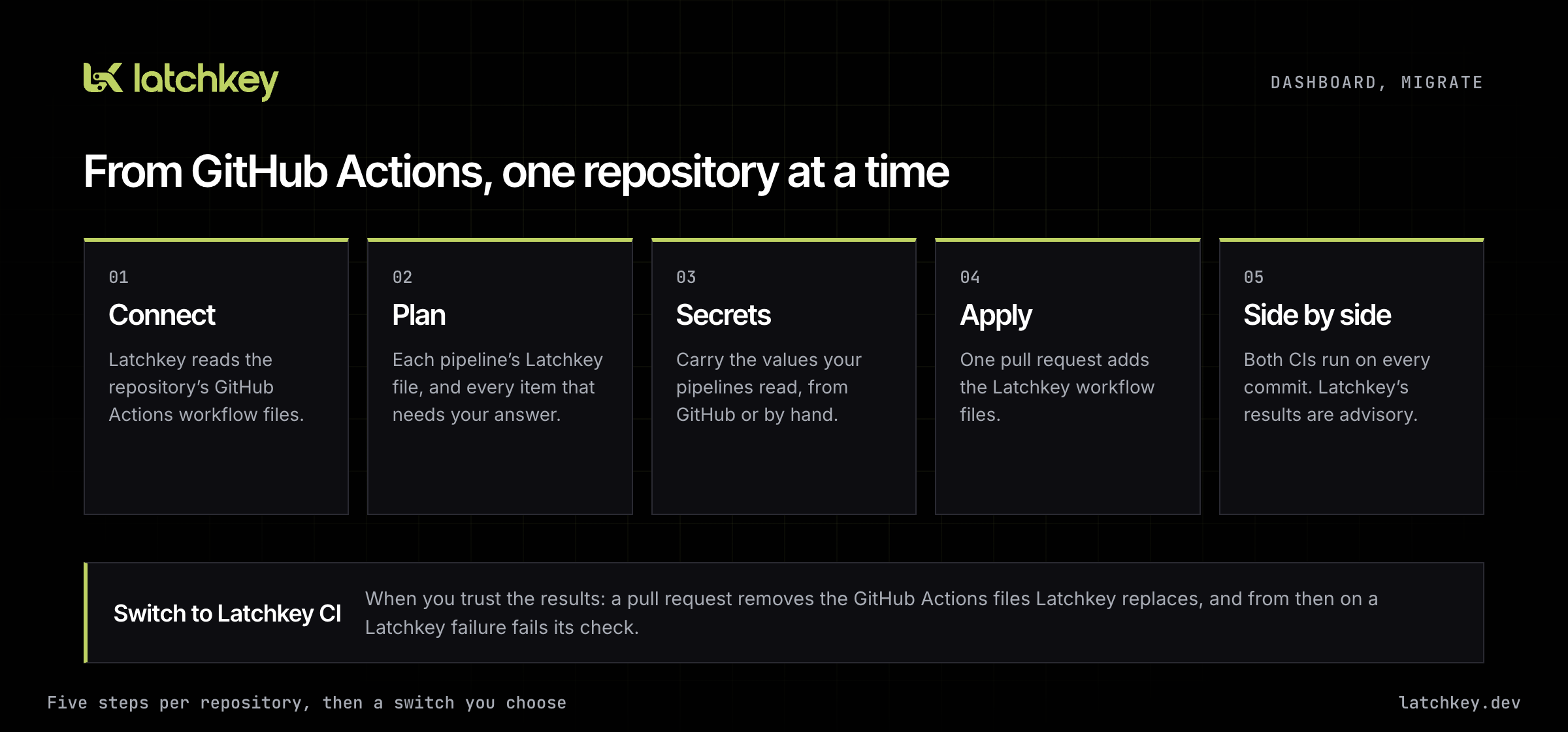
Connect reads the repository's GitHub Actions workflow files. Plan shows, for each pipeline, the Latchkey workflow file it becomes: what moves as written, what becomes a Latchkey step, and each item that needs a person's answer, such as a third-party action with no direct equivalent. Secrets lists the secret names your workflows read and carries their values to Latchkey, either typed in yourself or carried straight from GitHub by a short-lived workflow that you approve by merging its pull request and that is removed again afterwards. Apply opens one pull request that adds the Latchkey workflow files.
Then comes the part that makes it safe. After the apply, the repository runs in advisory mode: both CIs run on every commit, and a Latchkey failure is written as a neutral check whose title says what really happened, such as "Advisory: failed", so nothing blocks a merge. Side by side compares the two results commit by commit. A deploy job can run as a dry run while you trial it, so a trial never ships twice.
When you trust what you see, Switch to Latchkey CI opens the pull request that removes the GitHub Actions files Latchkey replaces. If another workflow on GitHub Actions only ran after one of them, the switch pull request names it first, so nothing goes quiet without warning.
The same flow is in the CLI as latchkey migrate plan, apply and status, and through MCP for your coding agent.
Secrets and environments
A pipeline that deploys needs credentials, and the right place for them is somewhere only the step that uses them can see.
Secrets. Set a secret for the workspace, a repository or an environment, on the Secrets tab in Settings or with latchkey secrets set. A step reads one as ${{ secrets.NAME }} in its env:, and Latchkey hands the value to that step alone, not to the job's other steps. The Secrets tab shows each secret's versions and which pipelines read it. A run of a pull request from a fork gets no secrets at all.
Environments. A job can name an environment:, and an environment can accept jobs only from the branches you set and wait for an owner or admin to approve the run before the job starts.
Cloud identity. Instead of storing long-lived cloud keys, a job can ask for a short-lived identity token that your cloud account trusts. latchkey/aws-login does it for AWS in one step, latchkey oidc request-token does it for anything else, and the docs walk through setting up the trust on AWS, Google Cloud and Microsoft Entra.
Spend limits and batch budgets
Agents run CI in bursts, and a burst should have a ceiling you chose. On the Billing page, an owner or admin can now set a spend limit: the most the workspace's runners may cost this calendar month. At the limit, Latchkey refuses new jobs, holds queued ones and stops running ones.
Inside that, jobs can be grouped into batches with a dollar budget each. latchkey run --batch <name> puts a job in a batch, latchkey budget set caps it, and latchkey run --budget <dollars> caps a single job. An API key can set a batch's first budget or lower it, but only an owner or admin can raise one, so an agent cannot talk itself into more money. The Billing page lists every batch with its budget and what its jobs have cost so far.
Latchkey CLI 0.9
The CLI went from 0.3 to 0.9 in October. The highlights:
latchkey cache restoreandsavekeep dependency downloads from one run to the next, the cache last issue said was coming.latchkey waitwaits for a set of jobs or a whole batch and exits 0 only if every one passed.latchkey artifact uploadanddownloadpass files between the jobs of a run.latchkey validate <file>checks a workflow file the way Latchkey compiles it, and prints the most one run can cost at list rates.
Every refusal now carries a code, latchkey run packs exactly what a fresh clone would contain, and the CLI tells you when a newer version is out. The changelog lists every release.
A dashboard built around runs
The dashboard was rebuilt around five places: Home, Runs, Runners, Insight and Settings. Runs lists what is running now and everything before it, with the cost of each job and a Cancel button. A run page draws the run's jobs as a board in the order their needs: give, with matrix legs, service containers and self-heal on each tile. A job's log streams live step by step, with search, a raw view and line numbers.
Everyone can pick a level of detail: Easy keeps each page to what most people check, Pro shows every number. A command palette jumps anywhere, and a failed job offers Hand to agent, a prompt your coding agent can pick up from there.
Plan and billing changes
Three changes to how plans work, all visible on the Billing page and in the docs.
Free minutes count by runner size. Every plan's allowance is unchanged (2,000 a month on Developer, 4,000 on Launch, 6,000 on Scale), but it is now counted in small-equivalent minutes: a minute on small counts as one, medium as two, large as four and xlarge as eight. The allowance resets on the first of each calendar month.
Runner minutes get their own invoice. Minutes past your allowance are billed on a separate invoice on the 1st of each month for the month just ended, apart from your plan's invoice. Rates are unchanged, from $0.0025 a minute on small.
Launch includes three seats, up from one, with extra seats at $5 a month.
Coming next
The direction for the coming months is getting teams that already use GitHub Actions onto Latchkey CI and keeping them there. Three things are in motion:
- An easier first run. Fewer steps between signing up and a green run, whether you start from a repository or from the terminal.
- Agents that change pipelines the way people do. An agent will propose a pipeline change as a pull request, Latchkey will show what the change does to the pipeline before you merge, and the merge is the approval.
- Speed and reliability. Latchkey CI jobs will get priority over batches of agent jobs when your workspace is busy, and self-heal will say on the check itself when it kept a job green.
GitHub Actions on Latchkey runners stays a supported way to run CI. If you move a repository with Migrate and something in the plan needs an answer we do not have yet, tell us through the Support page.
Previous issue: October Update: Refer & Earn, and Billing You Can See Coming