
September Update: Meet the Latchkey CLI

Kaveh Alemi
CTO, Latchkey
This update covers the biggest change to the platform since the runners: the Latchkey CLI, which runs any command on a fresh Linux runner from your terminal or your coding agent and hands back the verdict as an exit code. It also recaps everything else that shipped in August, including the audit of 156,808 failed CI runs behind self-heal's rules, and says where the platform is going and what is coming this month.
Platform core: stop pushing to find out
There is a loop every developer knows by heart. The tests pass locally. You push. CI goes red eight minutes later on a step you did not touch, because the runner has a different Node, or a clean node_modules, or is Linux and your laptop is not. You guess, push again, and wait another eight minutes.
The Latchkey CLI exists to delete that loop. One command runs whatever you were about to push, on a fresh Linux machine, from your terminal, and tells you the answer in the only form that matters: the exit code.
npm install -g @latchkeydev/cli
latchkey run 'npm test'
Progress narration goes to stderr, the job's own output goes to stdout verbatim.
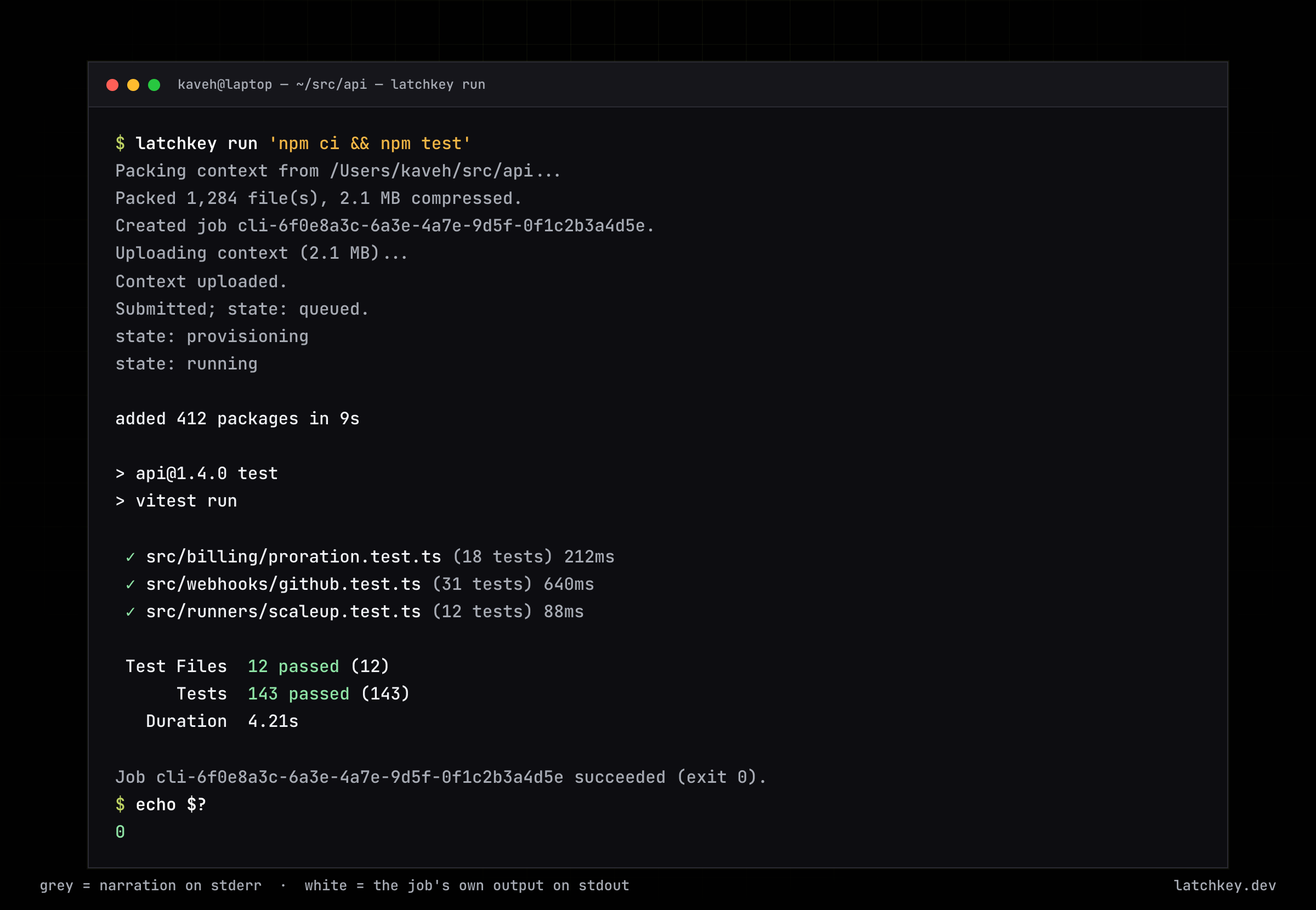
Five things happen in that session:
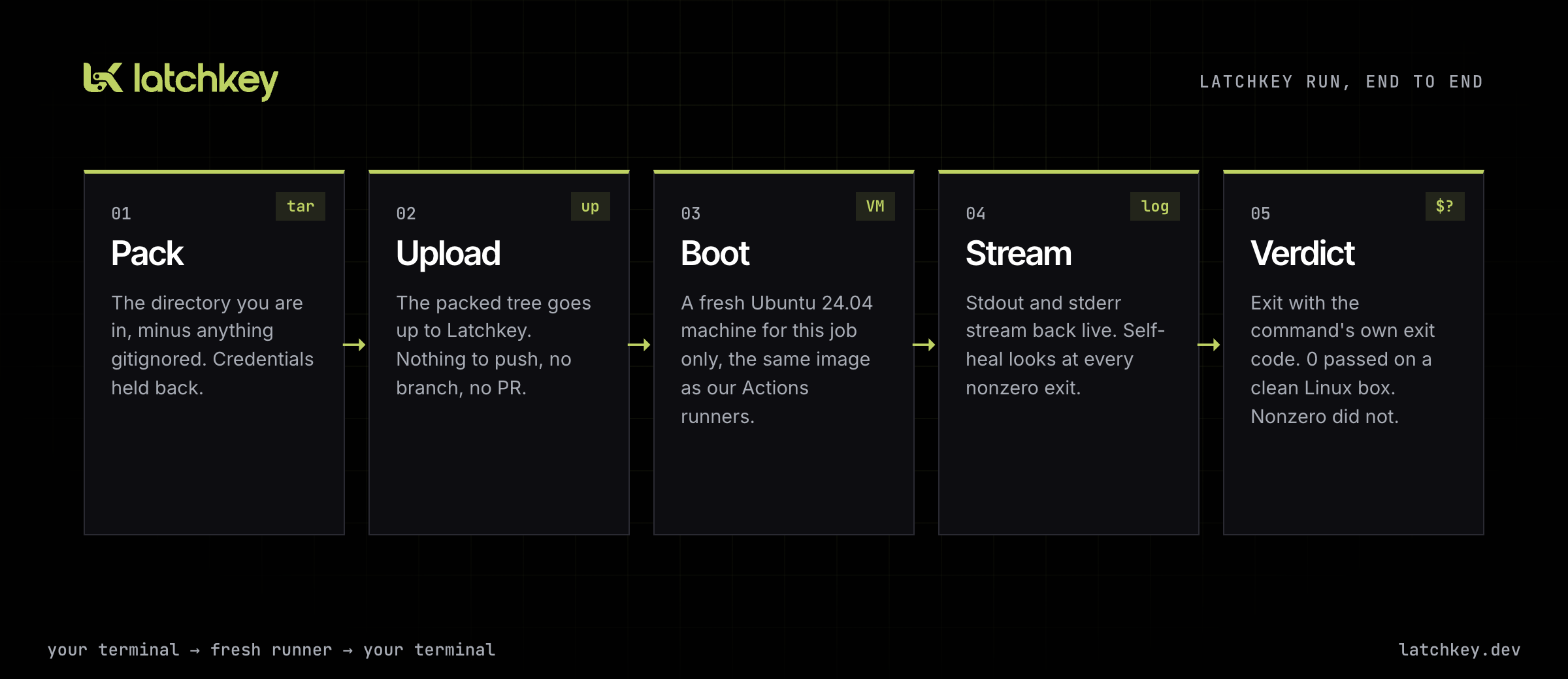
- Pack. The directory you are standing in is packed, not the enclosing repository. Run from
services/apiand the job seesservices/api. - Upload. The packed tree goes up to Latchkey. No commit, no branch, no pull request.
- Boot. A fresh Ubuntu 24.04 machine comes up for this job and only this job. It is the image our managed GitHub Actions runners use.
- Stream. Stdout and stderr come back live. Ctrl-C stops the tail, never the job; the notice tells you how to resume or cancel.
- Verdict. The process exits with the command's own exit code.
0means the suite passed on a clean Linux machine. Nonzero means it did not.
Why "fresh" is the feature
A persistent remote box with a cached checkout is fast, and it is exactly how you end up with a machine that passes for reasons nobody can reproduce. Every latchkey run job gets a machine of its own, with no leftovers from your previous job, and dependency installs run from scratch. If it passes, it passes on a machine that had never seen your project before.
The image carries several versions of Node, Python, Go, Java, Rust, Ruby and more, plus Docker and headless browsers.
Four sizes, chosen per job with --size:
| Size | vCPU | Memory | Price |
|---|---|---|---|
small (default) |
2 | 8 GB | $0.0025/min |
medium |
4 | 16 GB | $0.0050/min |
large |
8 | 32 GB | $0.0100/min |
xlarge |
16 | 64 GB | $0.0200/min |
Each step up doubles compute and the rate, so it pays for itself when it at least halves the job. Timeouts run from 30 seconds to two hours, with 30 minutes as the default.
latchkey run --size large --timeout 3600 'npm ci && npm run build && npm test'
What gets uploaded, and what never does
A naive upload would ship the .env your .gitignore never mentioned, so the CLI decides what ships in three passes, and the last one wins:
- Every
.gitignorein the tree. Build output,node_modulesand caches stay home. - A built-in credential deny-list: private keys,
.envfiles, cloud credential files and directories. Matched case-insensitively, so an uppercase.PEMis still a key. Every file held back is printed. - Every
.latchkeyignore, the documented escape hatch, which outranks both of the others.
The ordering is the point: a .gitignore three directories down cannot re-include a private key. If you genuinely need to ship one, you say so explicitly, and the CLI prints a warning naming the path:
# .latchkeyignore
!certs/ca.pem
For secrets the job actually needs, pass them as environment variables instead:
latchkey run --env DATABASE_URL="$DATABASE_URL" --env NODE_ENV=test 'npm run test:integration'
.git never ships, so pass a commit SHA through --env if the command needs one. An oversized context fails locally with the largest paths named, before anything is uploaded or billed.
Self-healing, even for a one-off job
The command runs under the same self-healing our CI steps get. When it exits nonzero, Latchkey diagnoses the failure, and you see that happen in the log stream.
A failing test suite is diagnosed and left alone, because a test that catches a real bug is doing its job. When the failure is the environment's fault (say your command calls jq and the machine lacks it), self-heal installs the missing tool, re-runs the command, and the exit code reflects the final attempt. When a heal does not work, the original exit code stands.
Platform core: built for agents first
Here is the part I care about most. The CLI was designed as a verification loop a coding agent can close on its own: run the check remotely, read the exit code, fix, re-run. Three things make that work.
The exit code is the verdict, and the contract is written down.
| Outcome | Exit code |
|---|---|
| Job succeeded | The command's code (normally 0) |
| Job failed | The command's code, or 1 if unrecorded |
| Job cancelled | 130 |
| Job expired before it started | 124 |
| Usage error | 2 |
| Auth, network or API error | 1 |
An agent never has to parse prose to know whether the build passed.
--output json turns the stream into NDJSON. One event object per line on stdout and nothing else; the human narration stays on stderr.
$ latchkey run --output json 'npm test'
{"event":"packed","compressed_bytes":184320,"file_count":142,"deny_listed":[]}
{"event":"created","job_id":"cli-6f0e8a3c-..."}
{"event":"uploaded"}
{"event":"submitted","job_id":"cli-6f0e8a3c-...","state":"queued"}
{"event":"state","state":"running"}
{"event":"log","index":0,"content":"\n> app@1.0.0 test\n> vitest run\n..."}
{"event":"log","index":1,"content":"Test Files  12 passed (12)\n"}
{"event":"state","state":"succeeded"}
{"event":"complete","job_id":"cli-6f0e8a3c-...","state":"succeeded","exit_code":0,"failure_reason":null}
Only complete ends the stream. One gotcha everyone hits once: piping the stream into a parser destroys the verdict, since $? belongs to the parser. Redirect to a file first, or read ${PIPESTATUS[0]}.
The package ships its own skill file. SKILL.md is in the npm package: the flags, events, exit codes and context rules. Point an agent at that one file and it can drive the whole CLI. Agents that prefer tools to a shell get the same surface over the Latchkey MCP server: run_job, get_job_status and get_job_logs.
latchkey watch: the other half of the loop
latchkey run is you asking Latchkey to check something. latchkey watch, which shipped in v0.2.0 on August 9, is Latchkey telling you something broke. It watches for CI failures that self-heal diagnosed but could not turn green (usually because the problem is in your code, which self-heal never touches) and hands each new one to your coding agent.
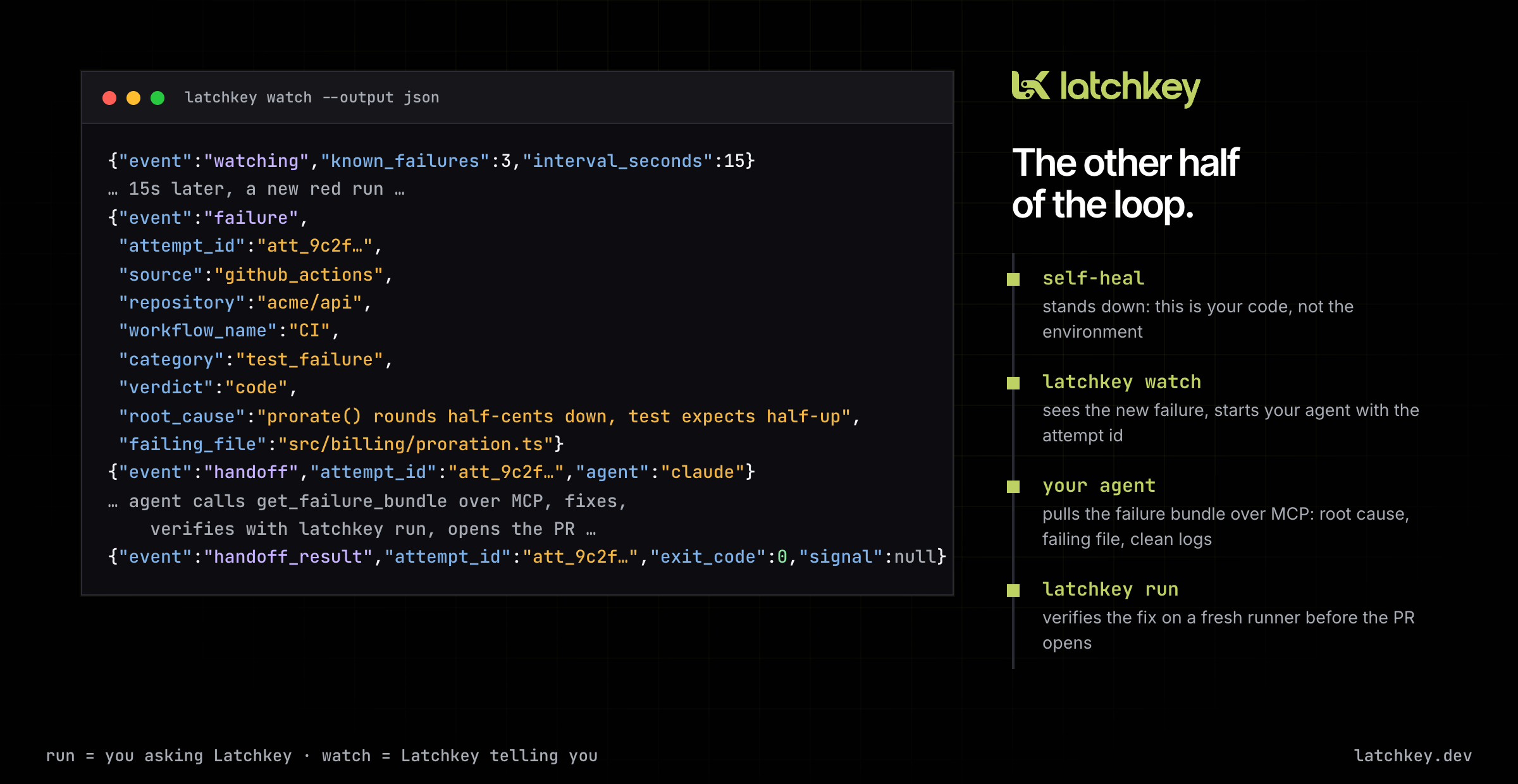
latchkey watch --once                   # what is failing right now
latchkey watch --agent 'claude -p'      # keep watching, hand each new failure to an agent
Failures that already existed when watch started are noted, not handed off; each new one goes to one agent, once, with its root cause and failing file printed.
What the agent receives is deliberately small: the id of the failure and an instruction to fetch the details from the Latchkey MCP server. The agent pulls the failure bundle (root cause, failing file, logs with secrets stripped, what self-heal already tried and why it stood down) as data, treats it as untrusted, fixes the code, verifies with latchkey run, and opens a pull request for you to review. Connecting the agent is one claude mcp add line; the exact command for your workspace is in the dashboard under Settings.
Platform core: using it day to day
Install and sign in. You need Node 20.18.1 or newer. Install the scoped name, @latchkeydev/cli, because the unscoped latchkey package on npm is an unrelated project. Mint a key under Settings, API keys, with the preset that allows running CLI jobs, then latchkey login (or set LATCHKEY_TOKEN for an agent or CI).
Keep track of jobs. A job keeps running if your terminal goes away. latchkey run --detach prints the job id and returns; latchkey status, logs --follow, list and cancel find and manage it from there.
A pre-push gate. Runs the exact CI command before the push leaves your machine, and blocks the push on a nonzero exit.
# .git/hooks/pre-push  (or a husky pre-push script)
#!/usr/bin/env bash
exec latchkey run --quiet 'npm ci && npm run lint && npm test'
What it costs. Per minute at the size's rate, rounded up per job, against the free minutes every plan includes: 2,000 a month on Developer, 4,000 on Launch, 6,000 on Scale. Queue and boot time are not billed. Since each job boots its own machine, one job that runs lint, build and test beats three jobs.
The honest limits.
- Not instant. Every run boots a fresh machine, so expect some boot time, every time. Failures also take a little longer than passes, because every nonzero exit is diagnosed first.
- Not interactive. No stdin, no TTY. Anything that prompts hangs until the timeout.
- Not for things that never exit. A dev server runs until the timeout fires, billing the whole way.
- Not on your network. The runner cannot reach your local database or your private network.
What 156,808 failed runs taught us
On August 9 we published the audit that shaped how self-heal decides what to touch. We pulled every failed GitHub Actions run from eight large open source codebases (PostHog, Grafana, ClickHouse, Home Assistant, Coder, Next.js and two smaller repositories) between January and March 2026: 156,808 failed runs across Go, Python, C++, TypeScript and Rust. It skews toward the projects with enormous test matrices, so read it as the shape of what breaks in a big CI matrix rather than in CI generally.
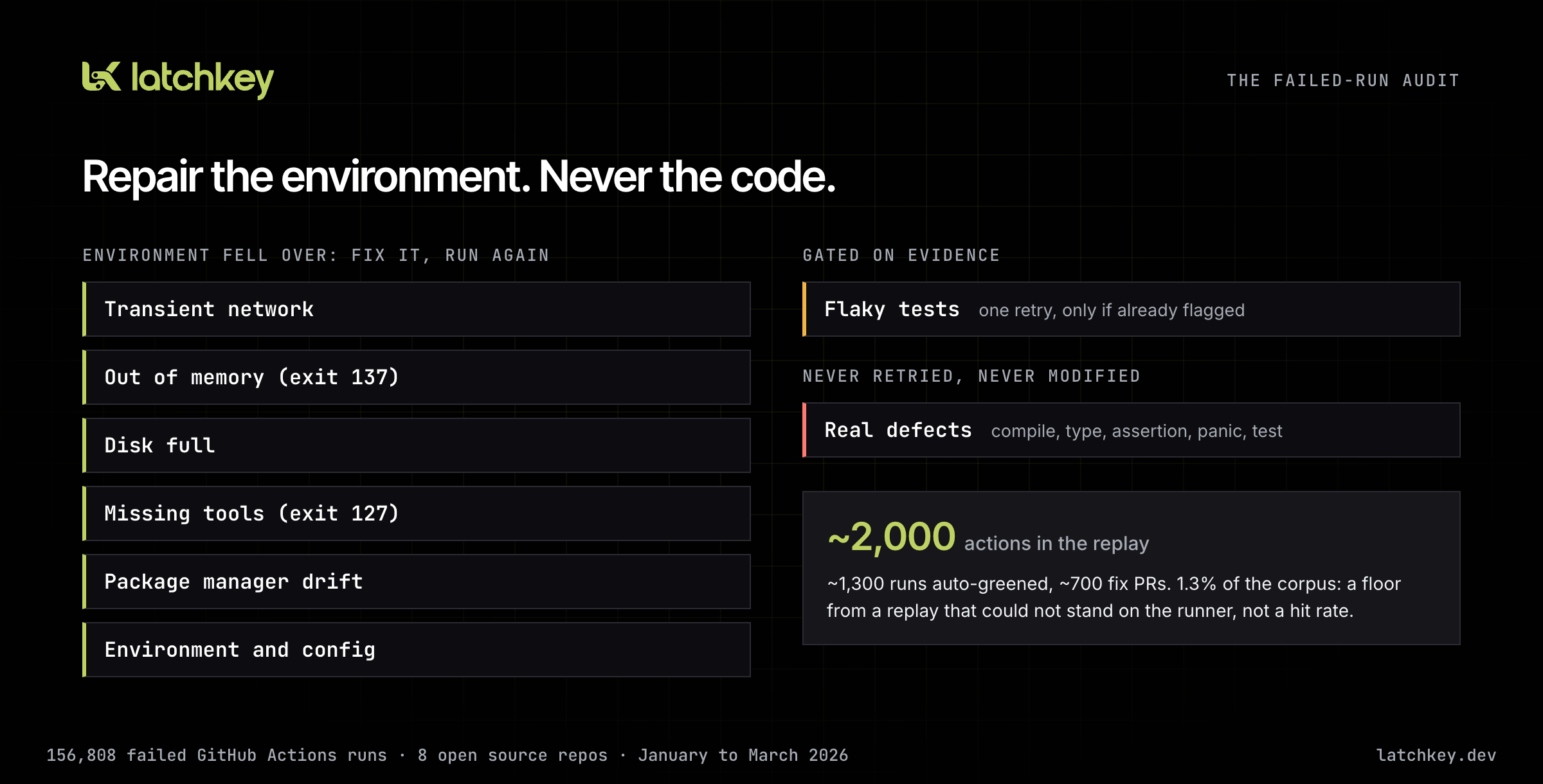
A red build is not always "someone broke something." A registry returns 500s, the disk fills, Node runs out of heap: none of those are defects, and no commit fixes them. The failures fell into environment classes (transient network, out of memory, disk full, missing tools, package manager drift, environment and config), flaky tests, and real defects. The rules it produced are the ones self-heal still follows:
- Repair the environment, never the code. Compile errors, type errors, assertions, panics and genuine test failures are never retried and never modified. Real failures stay red.
- No hiding results. Rerunning a failing test until it goes green,
--legacy-peer-depsor|| trueclear the symptom and ship the cause. We do none of them. - Flaky retries need evidence. A test is re-run only when that workflow is already known to pass on retry, and it runs once.
- Permanent fixes arrive as pull requests you review.
Replaying our detection and repair against the corpus produced roughly 1,300 runs auto-greened and roughly 700 fix pull requests. About 2,000 actions against 156,808 failures is 1.3%. A replay reads logs but cannot stand on the runner and verify a repair, so treat 1.3% as a floor, not a hit rate. We also open sourced CI Doctor, an MIT-licensed agent skill that does the diagnosis half locally, with no account.
Platform vision: the check belongs where the work happens
Last month I wrote that Latchkey had been a runner inside someone else's CI, and that we were starting to build it as the place CI runs. The CLI is the first piece of that you can hold.
Most code at Latchkey is written by agents now, so our review gate is the test suite and CI rather than a human reading every line. latchkey run moves the gate to before a pull request exists, and latchkey watch hands whatever still goes red back to an agent. That is the loop CI has to support in the agent era: run, read the verdict, fix, run again, with no human relaying anything.
Three beliefs sit under the bet:
- CI is a service you call, not only a place your push lands. A terminal, a coding agent and a
git pushshould all be ways in, onto the same clean machine. - Your code host is an integration. It does what only it can do, such as holding the code and showing the check, rather than being the only door.
- The rules travel with the runs. Repair the environment, never the code; real failures stay red; permanent changes arrive as pull requests you review. Whatever the way in, those hold.
GitHub Actions keeps working exactly as it does today. Nothing about this direction asks you to move your existing workflows.
Coming next
The CLI's job surface is the foundation for running whole pipelines on Latchkey, not just single commands. That is a direction for the coming months rather than something to preview in detail; we will say so plainly when there is something to try.
Closer in, this month is about the account side of the platform:
- Clearer billing notices. When a paid workspace reaches its included runner minutes, the dashboard and usage notices will say that further minutes are now billed, at the rates for the sizes you actually ran, instead of staying quiet.
- Refer & Earn. A referral program: share a link from the dashboard, and when the team you invited is set up, both workspaces get bonus runner minutes on top of their plan.
To try the CLI now: npm install -g @latchkeydev/cli, mint a key, latchkey login, then latchkey run 'npm test'. The CLI documentation has the full reference. If you build something with it, tell us through the Support page.
Previous issue: August Update: Insight v2 and Heals That Verify Themselves · Next issue: October Update: Refer & Earn, and Billing You Can See Coming