
July Update: Your Coding Agent Can Fix What Self-Healing Won't

Kaveh Alemi
CTO, Latchkey
This update covers June: the CI failures self-heal won't touch now go to the coding agent already open in your editor, over the Model Context Protocol, and every one of them arrives with a written explanation. It also covers faster job pickup and zero-setup multi-arch builds on our runners, where we think CI is heading now that agents write so much of the code, and what we're working on this month.
Platform core: handing real failures to your coding agent
Self-heal has one rule it never breaks: it doesn't edit your code. If a step fails because a registry returned a 503, a disk filled up or a tool was missing, the runner fixes the environment and re-runs the step. If a step fails because your test caught a real bug, self-heal leaves it red. That rule is why you can trust it. It's also why, until June, a real failure still ended the way it always had: someone opened the log and started reading.
Two kinds of red build look identical on a GitHub checks page. In one, the environment let you down. In the other, the code is wrong. The first needs a fast mechanical fix and no judgment. The second is all judgment, and the judgment belongs to whoever owns the code.
Most teams we talk to already have a coding agent open all day, with the repository and the ability to run tests and open pull requests. What it lacks is the failure: it gets whatever log you paste in, and GitHub's step log is masked and often truncated. So the job was narrow: give your agent what our runner already knows, without anyone copying anything around.
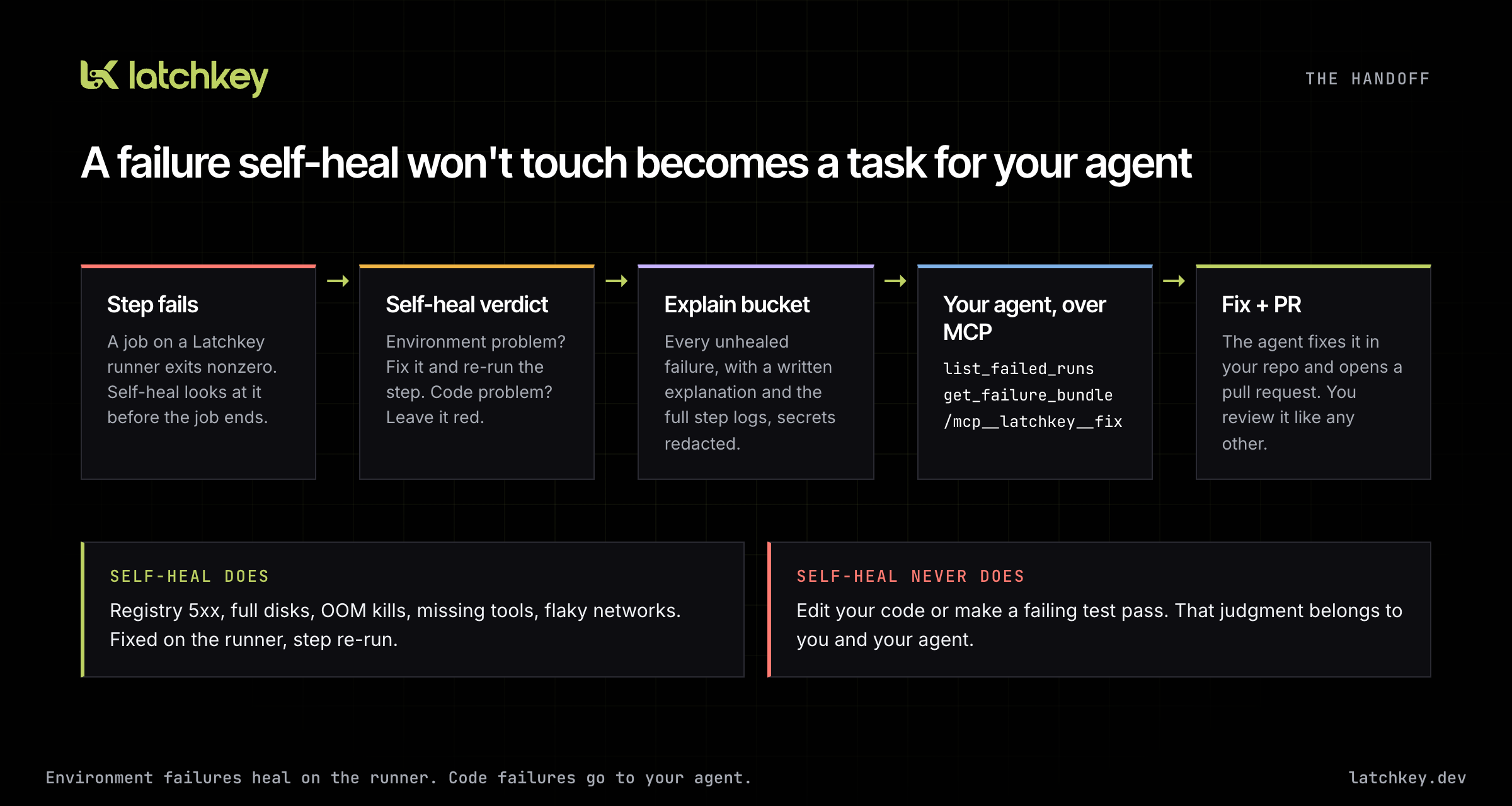
The principle is intact: self-heal repairs the environment, never the code, and real failures stay red. What changes is that a red build becomes a task your agent can pick up, and any code change arrives as a pull request you review.
What your agent receives
Latchkey now runs an MCP server at https://latchkey.dev/mcp. It exposes two tools and one prompt.
| Name | Kind | What it does |
|---|---|---|
list_failed_runs |
tool | The runs self-heal did not turn green, newest first. Filter by repository (owner/repo), verdict, since and limit. |
get_failure_bundle |
tool | Everything we know about one failure. |
fix |
prompt | "Root-cause this and fix it in code", wrapped around the bundle for one failure. Without an id, it picks the most recent unhealed failure. |
"Not turned green" covers two outcomes: failures self-heal judged to be real code, test or config problems and left alone, and failures where self-heal tried an environment fix and the re-run still failed. Both belong to your agent. A heal that worked never shows up, since there's nothing left to do.
The bundle is the product. Everything else is plumbing to get it into your agent's context.
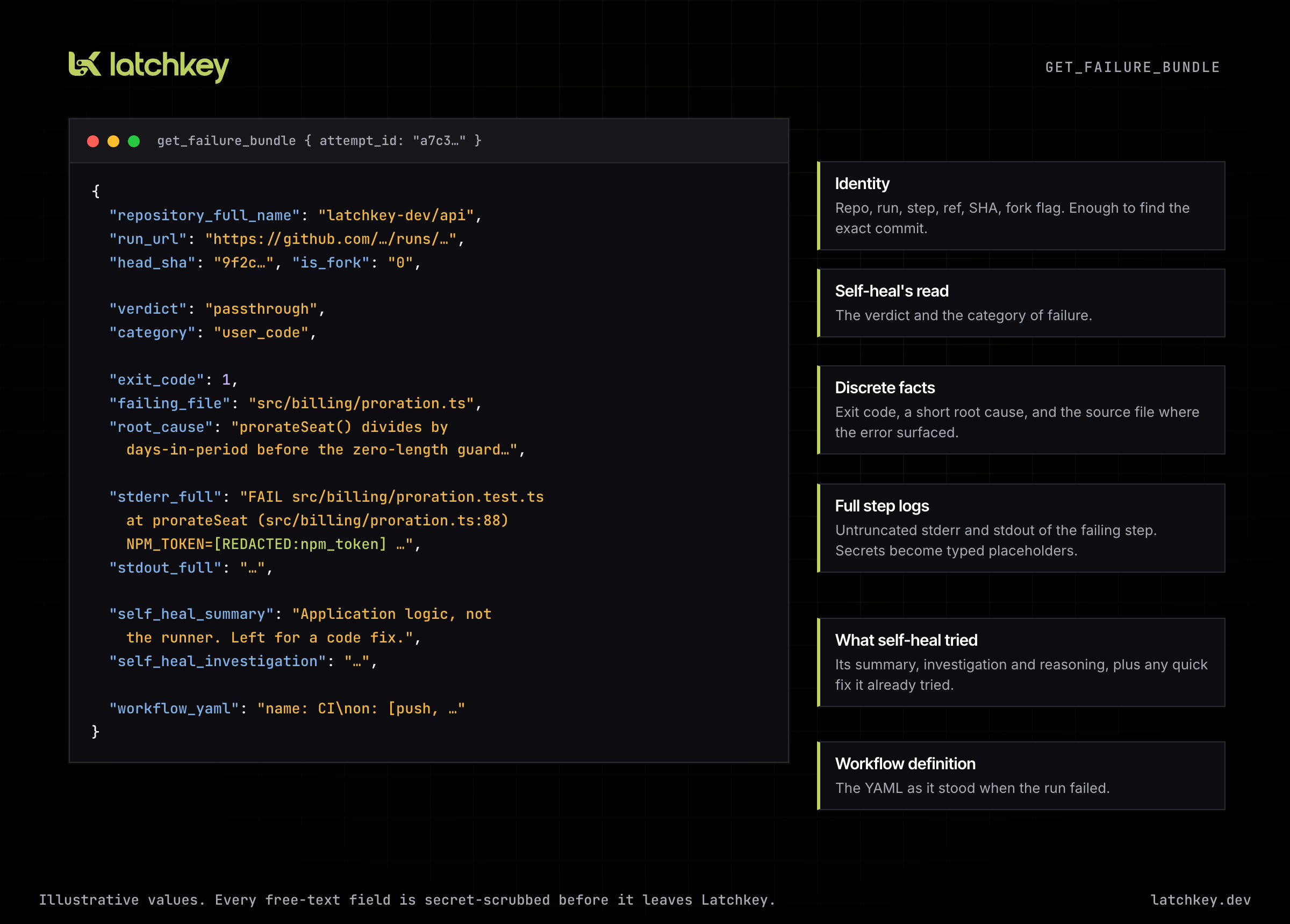
- Identity. Repository, run and link, step, workflow path, event, ref, commit, and whether the run came from a fork.
- The root cause, in plain terms. Self-heal's verdict and failure category, plus three facts an agent shouldn't have to dig out of prose: the exit code, a one-paragraph root cause, and the failing file (the source file where the error surfaced, not a file self-heal wanted to change).
- The logs, all of them. The full stderr and stdout of the failing step as the runner captured it, not GitHub's excerpt. This is the difference between an agent guessing from a truncated log and an agent reading the actual stack trace.
- What self-heal already tried. Its summary, investigation and reasoning, including any environment fix that didn't help, so your agent doesn't repeat it.
- The workflow definition as it stood when the run failed.
Secrets are redacted before anything leaves
A process on a CI runner writes raw bytes, and GitHub's secret masking only applies to its own log viewer. So every free-text field in a bundle passes through redaction before it leaves Latchkey. Known credential formats, sensitive-looking assignments and long random tokens are replaced with typed placeholders like [REDACTED:npm_token], so your agent can see that something was there and what kind of thing it was, without seeing the value. We lean toward over-redacting: a false positive costs the agent a little context, and a false negative is not acceptable. It's a strong filter, not a proof, so don't print secrets in CI.
One correction: earlier writing about this feature said Latchkey never stores source code. That was too broad. A bundle contains your workflow YAML and everything your failing step printed, including any source lines your tests print. We keep CI logs and workflow definitions for failed steps and serve them only to your organization's keys. Both tools are read-only, and a key can only ever read its own organization's failures.
Connecting your agent
Settings has a new API Keys tab. Name a key, pick an expiry (never, 30, 60 or 90 days, or a year) and generate it. The key is shown once. While it's on screen, the "Connect your agent" card fills it into the setup command for you.
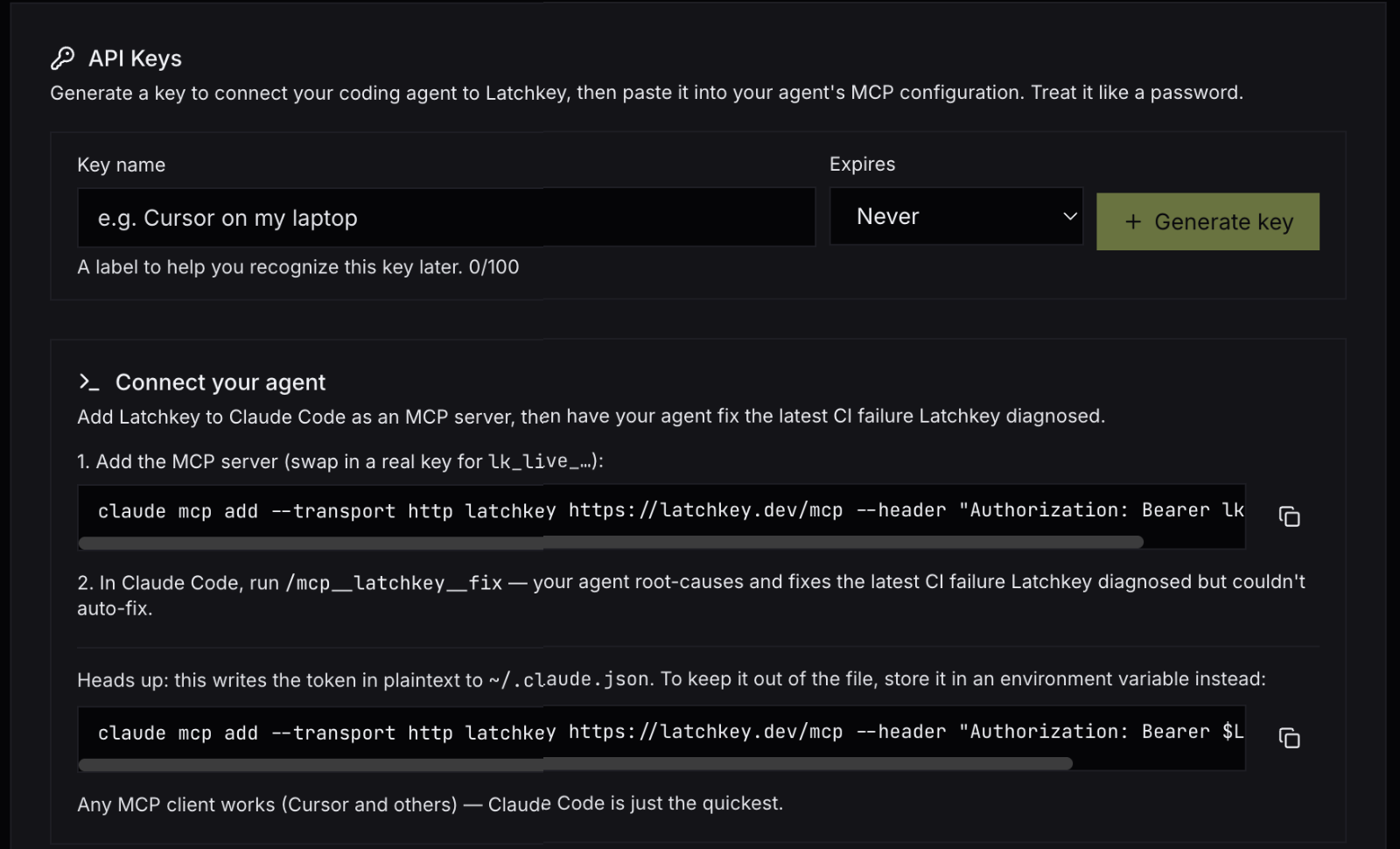
The Connect your agent card, with the environment-variable variant below the plain command.
For Claude Code:
export LATCHKEY_API_KEY=lk_live_...        # your key, not this placeholder
claude mcp add --transport http latchkey https://latchkey.dev/mcp \
  --header "Authorization: Bearer $LATCHKEY_API_KEY"
If you paste the key directly into the command, Claude Code writes it in plaintext to ~/.claude.json. The environment-variable form keeps it out of that file.
For Cursor, add the same server to ~/.cursor/mcp.json:
{
  "mcpServers": {
    "latchkey": {
      "url": "https://latchkey.dev/mcp",
      "headers": { "Authorization": "Bearer ${env:LATCHKEY_API_KEY}" }
    }
  }
}
Then ask for the fix. In Claude Code, the fix prompt shows up as a slash command named after the server:
/mcp__latchkey__fix
Other MCP clients list it alongside their other prompts. You can also just ask: "list today's failed Latchkey runs on latchkey-dev/api and fix the latest" is enough for the agent to call the tools itself.
The prompt lives in the server, so every client gets the same text. It tells the agent to read the bundle, find the root cause in code, tests or CI config, make the smallest correct fix, never mask or skip the failure, and open a pull request if it can. "Make CI green" is easy to satisfy the wrong way, so the prompt spells out that skipping a test is not a fix. Give each machine its own key and pick an expiry, so revoking one is painless.
Platform core: an explanation for every unhealed failure
Until June, self-heal wrote a report only when it acted. That's the wrong shape for a handoff, because the failures your agent needs most are the ones self-heal chose not to touch. So we changed what happens after a failure.
- Known environment fixes stay instant. When self-heal recognizes a failure it knows how to fix, it fixes it and re-runs the step straight away.
- Everything else gets investigated and explained. A failure that isn't a known environment problem goes to the Claude agent behind self-heal's investigation. It tries a heal if the environment is at fault, and whatever it decides, it writes an explanation: what failed, why, and where.
- A fix that didn't work gets a second look. If a known fix is applied and the re-run still fails, the failure is investigated with both errors and the fix that was tried.
That explanation becomes the root cause and failing file in the bundle, and it's what you see in the dashboard. When a quick fix was tried first, the healing drawer tells it as one story instead of two entries. Self-heal also recognizes more everyday environment failures (network hiccups, cache-filled disks, missing system packages), and for common setup gaps it tells you which workflow step to add.
Platform core: faster pickup and multi-arch builds
Faster job pickup on every plan. Every plan, Developer included, now keeps ready latchkey-small runners on standby, so a queued job usually starts on a machine that's already booted and registered. Nothing to configure.
Multi-architecture Docker builds, no setup. Latchkey runners now come ready to build for other CPU architectures:
jobs:
  image:
    runs-on: latchkey-medium
    steps:
      - uses: actions/checkout@v4
      - run: docker buildx build --platform linux/amd64,linux/arm64 -t myapp:ci .
No setup-qemu-action, no separate builder step. RUN steps for the foreign architecture just execute, and existing setup steps keep working.
Runners that hold less. A CI runner runs code we didn't write, by design, so we reduced the credentials our runners carry to the minimum they need. None of this changes what your jobs can do.
Platform vision: CI as the agent's feedback loop
Since January our bet has been that CI changes character once agents write a large share of the code. More changes arrive, from more authors, and each one needs a verdict. The pipeline stops being a gate that a person checks now and then and becomes the main way an agent learns whether its work is correct.
June made the division of labour we believe in concrete. The runner handles the environment, because it is the only party that saw the machine fail and the fix is mechanical. Your agent handles the code, because it has the repository and the context. You handle the judgment, because every permanent change arrives as a pull request you review. Self-heal never crosses into code, the agent never has to guess at a log, and nobody has to paste anything between them.
What we learned building the handoff is that the runner knows far more than CI usually reports. It has the full output, the exit code, the environment and what was already tried. Most of the value was in delivering that without loss, not in adding more intelligence on top.
The weak point is time. Today an agent still finds out whether its fix works the slow way: push, wait for a run, read the result. An agent working at its own pace needs that loop to be short, checkable and clean. That is where we want Latchkey to be most useful, and it shapes what comes next.
Coming next
Triage across failures. Where fix goes deep on one failure, a second MCP prompt is coming this month that goes wide: look across your recent unhealed failures, group the ones that share a cause, separate flaky failures from real defects, and suggest where to start.
A rebuilt insights experience. We are rebuilding the insights side of the dashboard around fewer, more concrete findings, each with one clear action attached, whether that is a change you can apply as a pull request or a failure to hand to your agent.
Heal pull requests that check themselves. When self-heal proposes a permanent environment change, we want that pull request to show whether the fix actually held before you are asked to review it.
More of the loop. June gave your agent the failure. In the coming months we want an agent to be able to check its own fix on a clean runner before it asks you to review anything. That is direction, not an announcement.
If you connect an agent this month, I'd like to hear what it did with the first bundle it read, good or bad. Reach us through the Support page.
Previous issue: June Update: Self-Healing CI Is On by Default · Next issue: August Update: Insight v2 and Heals That Verify Themselves